
Let’s be honest: you built your website, posted it, and then… nothing. No inquiries from Google. No strangers finding you. Just crickets and the occasional visit from your mom.
You’re not alone. Most photography websites are practically invisible on Google, and it’s not because photographers aren’t talented. It’s because great photos and great SEO are two completely different skills. The good news? Getting your website found is absolutely learnable, and this post is going to walk you through exactly how to do it.
Why Your Photography Website Isn’t Showing Up (And What Google Actually Wants)
Google’s job is to match people searching with the most helpful, trustworthy, and relevant results. When someone types “wedding photographer in Charleston,” Google is scanning thousands of websites trying to figure out who deserves to be on page one.
Here’s what Google is looking for:
- Relevance: Does your website clearly say what you do and where you do it?
- Authority: Do other reputable websites link to yours?
- Experience: Is your site fast, easy to use, and mobile-friendly?
- Content: Do you have enough words on your pages for Google to understand what you offer?
Most photography websites fail on relevance and content. A gallery of beautiful images with no text is essentially invisible to Google. Search engines can’t read photos. They read words.
Start With the Right Platform: Why Showit Is the Smart Choice for Photographers
Before we get into SEO tactics, we need to talk about your foundation. The platform you build your website on matters more than most photographers realize.
Showit is hands-down one of the best website platforms for photographers who want to rank on Google, and here’s why:
It gives you design freedom without sacrificing SEO. Many drag-and-drop builders bury your content in bloated code that Google struggles to crawl. Showit’s architecture is different. It pairs a visually stunning, fully customizable canvas with a WordPress blog backend, which is one of the most SEO-friendly blogging platforms in existence.
The blog is where the real SEO magic happens. Showit’s WordPress integration means you can publish keyword-rich blog posts that build your authority over time. That blog post you write about “what to wear for your engagement session in Nashville” can rank and bring in brides on autopilot for years.
It loads fast and works beautifully on mobile. Google prioritizes mobile-friendly, fast-loading websites. Showit-built sites consistently perform well on both fronts.
If you’re still on a platform that limits your customization, slows your site down, or makes blogging feel like a chore, it might be time to make the switch. Try Showit here and see the difference for yourself.
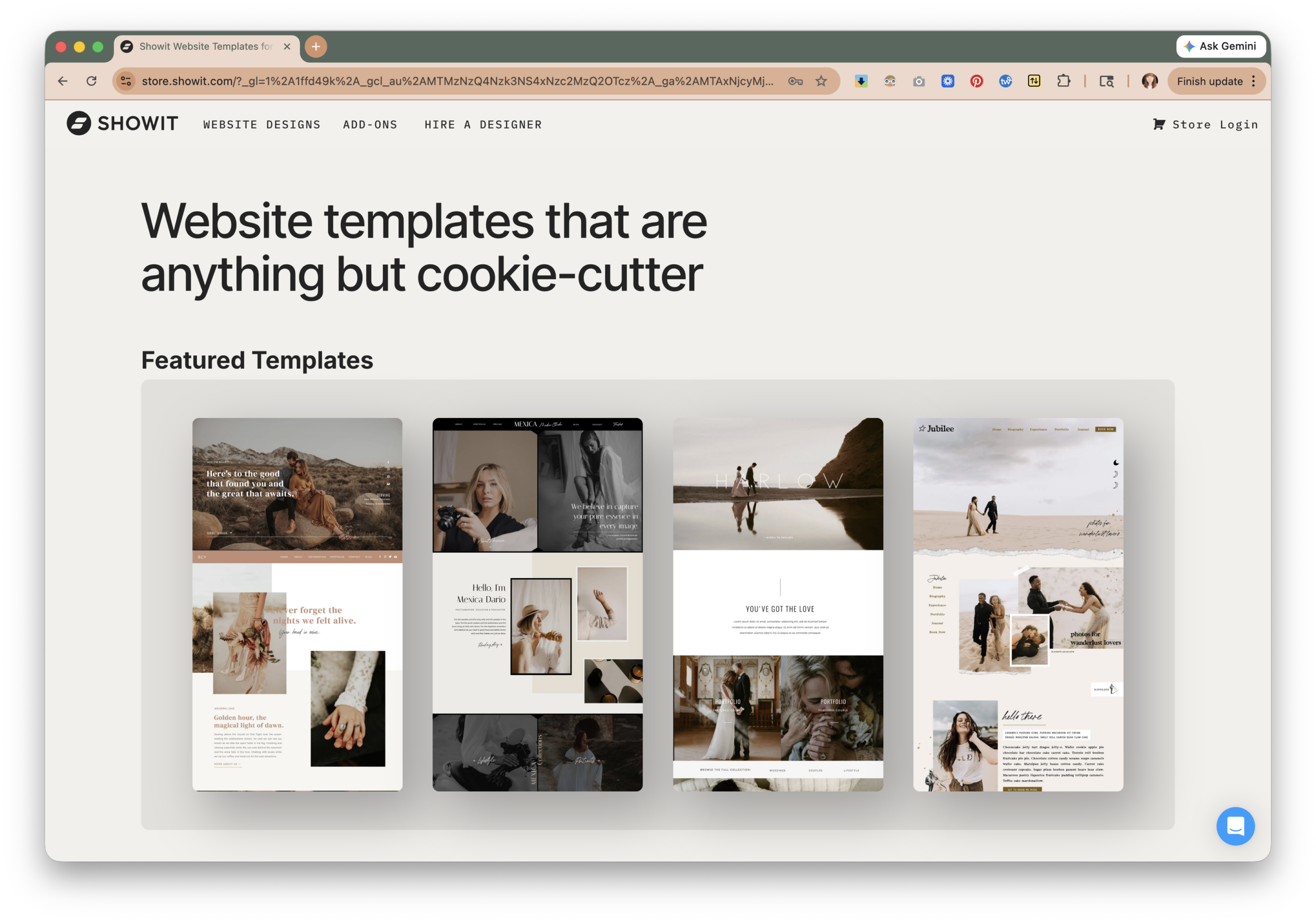
Samples of Showit templates for creatives
Step 1: Get Crystal Clear on Your Keywords
Keywords are the phrases people type into Google when they’re looking for someone like you. Your entire SEO strategy starts here.
Don’t try to rank for “wedding photographer.” That term is dominated by directories like The Knot and Zola. You will not beat them. Instead, go local and specific.
Think like your ideal client. They’re searching things like:
- “Wedding photographer in [your city]”
- “Intimate wedding photographer [your region]”
- “Outdoor elopement photographer [state]”
- “[Venue name] wedding photographer”
How to find your keywords:
- Type your service into Google and look at the autocomplete suggestions. Those are real searches people are making.
- Scroll to the bottom of the results page and look at “People also search for.”
- Use a free tool like Ubersuggest or Google’s own Keyword Planner to see search volumes.
Write down 10 to 15 keywords and group them by topic. These will guide every page and blog post you create.
Step 2: Optimize Your Core Pages
Your homepage, about page, and services page are doing most of the heavy lifting. Here’s how to make sure they’re working for you.
Your homepage needs to state who you are, what you do, and where you do it within the first few seconds. Don’t lead with just your logo and a moody hero image. Google needs text. Your clients need reassurance they’re in the right place.
A strong homepage headline might look like: “Nashville Wedding Photographer for Couples Who Want Their Day to Feel Like Them.”
That one sentence tells Google your location, your niche, and your value. That’s SEO and copywriting working together.
Every page needs a title tag and meta description. These are the snippets that appear in Google search results. Showit makes it easy to customize both. Your title tag should include your primary keyword and your location. Your meta description should be a compelling 150-character summary that makes someone want to click.
Use headers strategically. Structure your page with H1, H2, and H3 headers that include your keywords naturally. Think of headers as the outline of your page. Google reads them closely.
Step 3: Create Location-Specific Pages
If you shoot in multiple cities or venues, create a dedicated page for each one. These are called location pages, and they can be a serious ranking asset.
A page titled “Asheville Wedding Photographer” that includes relevant content about Asheville weddings, local venues you love, and your experience shooting in the area can rank for that specific search.
Each location page should have:
- At least 500 words of original, helpful content (not duplicated from other pages)
- A keyword-rich title tag and meta description
- Real images from weddings in that location
- A clear call to action to get in touch
This is one of the highest-impact things you can do for local SEO, and most photographers completely skip it.
Step 4: Start Blogging with Strategy (This Is the Long Game)
Your blog is your biggest SEO asset if you use it correctly. But posting a pretty gallery with five lines of caption is not going to move the needle.
Google-optimized blog posts need:
- A clear focus keyword in the title and throughout the post
- At least 800 words of helpful, readable content
- Headers that break up the content logically
- Internal links to your other pages and past posts
- A strong call to action at the end
What should you blog about?
Start with your couples’ questions. What do they ask you before booking? What do they Google when planning their wedding? Those questions are your content calendar.
Some ideas to get you started:
- “[Venue name] Wedding: Real Couple Feature” (ranks for that venue)
- “What to Expect on Your Wedding Day as a Couple Who Hates Photos”
- “Best Times of Year to Get Married in [Your City]”
- “How to Choose a Wedding Photographer: What No One Tells You”
Aim to publish one to two posts per month consistently. Consistency beats frequency every time.
Step 5: Speed and Technical SEO (The Stuff That Runs in the Background)
You don’t need to become a developer to nail technical SEO, but there are a few things worth knowing.
Image optimization is the biggest win for photographers. Uncompressed, full-resolution images are the number one reason photography websites load slowly. A slow site kills your rankings and your user experience. Before uploading any image to your site, compress it. Target file sizes under 500KB for most images, under 200KB for smaller ones.
Tools like ImagenAI and Aftershoot are incredible for streamlining your editing workflow, which means your galleries get delivered faster and your culled, edited images are ready to go up on your site sooner. Aftershoot also gives you a 10% discount with that link, and ImagenAI offers 1,500 free edits so you can try it out with no risk.
Set up Google Search Console. This is a free tool from Google that shows you what keywords you’re ranking for, which pages are getting clicks, and any technical errors Google found on your site. It’s essential and takes about 15 minutes to set up.
Make sure your site has an SSL certificate. This is the little padlock in the browser bar that makes your URL start with “https” instead of “http.” Google penalizes sites without it. Showit includes this automatically.
Step 6: Build Backlinks (Google’s Trust Signal)
A backlink is when another website links to yours. Google treats backlinks like votes of confidence. The more quality websites that link to you, the more Google trusts you.
How to get backlinks as a photographer:
- Submit to wedding directories: The Knot, WeddingWire, Junebug Weddings, and Style Me Pretty all allow vendor listings. These are legitimate, respected sites and their links carry weight.
- Get featured on venue websites: Reach out to your favorite venues and ask if they’ll add you to their preferred vendor list. Many venues have a page that links to photographers. That’s a backlink.
- Submit to wedding blogs: Real wedding features on blogs like Green Wedding Shoes or Rock n Roll Bride come with a link back to your site.
- Collaborate with vendors: Blog about your vendor partners and ask them to share and link back to your post.
Backlink building is slow and ongoing, but every link you earn is an asset that compounds over time.
Step 7: Write Copy That Converts, Not Just Copy That Ranks
SEO gets people to your website. Your copy is what makes them stay and inquire.
There’s a common trap photographers fall into: writing copy that’s all about themselves. “I’m so passionate about love and light and capturing moments…” Your client doesn’t care yet. They care about whether you understand them, whether they’ll feel comfortable around you, and whether you can deliver what they’re imagining.
Your copy should:
- Speak directly to your ideal client’s fears, dreams, and specific situation
- Make them feel seen before they’ve even talked to you
- Position your process and personality as the answer to what they’re looking for
- End every section with a clear direction on what to do next
This is where great copywriting pays for itself. The difference between “inquire here” and a three-sentence closing paragraph that speaks directly to your client’s hesitations is often the difference between a bounce and a booked call.
Ready to Stop Guessing and Start Getting Found?
SEO is not a one-time project. It’s a long game that rewards consistency, quality, and strategy. But when it clicks? Your website starts working while you sleep.
If you’re feeling overwhelmed by all of this, that’s completely normal. Most photographers didn’t get into this industry to become marketing experts. That’s where I come in.
I offer done-for-you web design built on Showit specifically for wedding photographers. Every site I build is designed with SEO baked in from day one: fast-loading pages, strategic structure, optimized images, and the technical foundations that give Google everything it needs to understand and rank your site.
I also offer SEO services and strategic copywriting for photographers who want their words to do the heavy lifting. Whether you need a full website rewrite, individual page optimization, or a blogging strategy built around your target keywords, I can help you get there without spending hours trying to figure it out yourself.
If you want a website that actually shows up and actually converts, let’s talk.
And if you’re looking to streamline your editing workflow while you’re at it, check out ImagenAI (1,500 free edits to get started) and Aftershoot (10% off with this link). More time away from Lightroom means more time on the parts of your business that grow it.

